Space Goals
Build a mail management center:
- Email Sync & Display: Automatically fetch the latest emails via the mail plugin (
call_mcp(server_name="gmail")), persist them into Space data, and display them as a list (with pagination, keyword/contact/tag filters, email detail view, and local deletion). - Contact Management: Support contact CRUD; contacts can be tagged (e.g. "Client, Colleague, Important").
- Query Emails by Contact: On the Emails tab, filter emails by contact (or contact tag); on the Contacts tab, clicking "View Emails" jumps directly to the emails related to that contact (matched by sender or recipient).
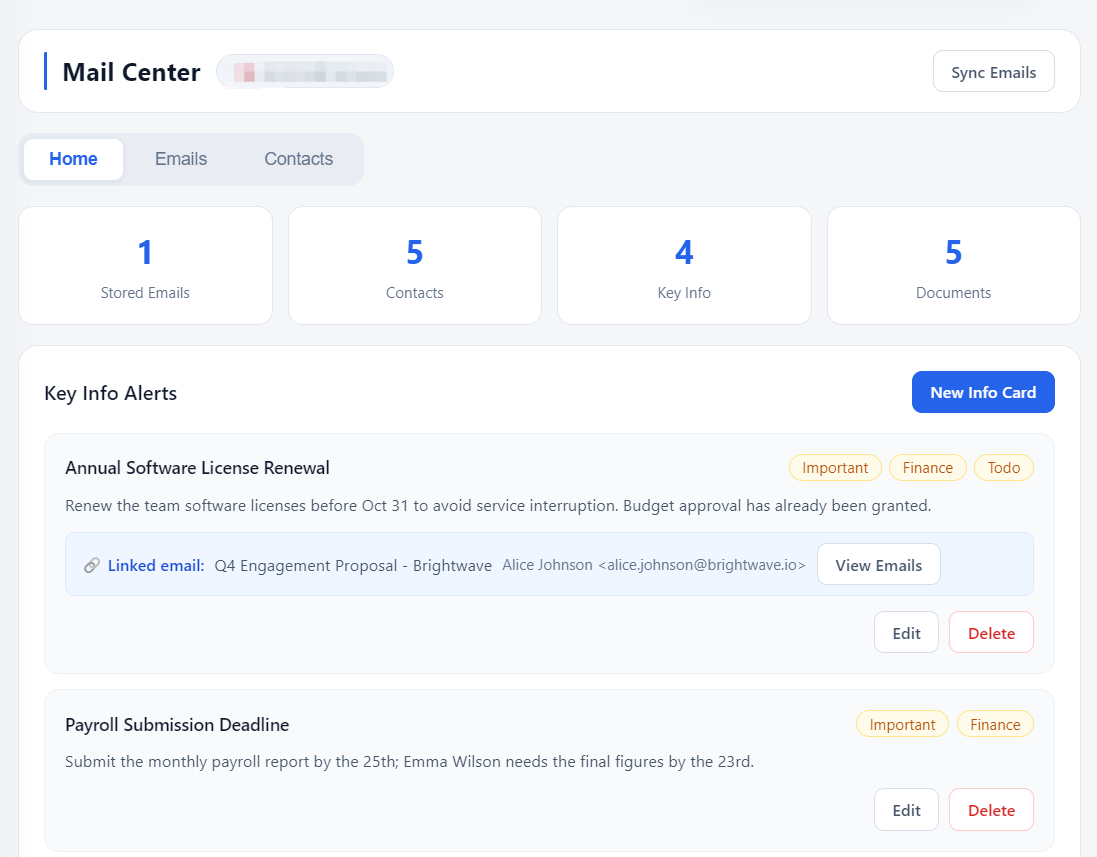
- Home Page (Key Info Alerts + Document Organization): Key info cards (title, description, multiple tags, linked email jump to details, edit/delete); documents (title + first 2 lines of content overview, Markdown detail rendering, edit/delete, keyword search).
How to Access
End users simply open the Space page to use it:
- Emails Tab: Click "Sync Emails" at the top right to fetch the latest emails from Gmail; the top filter bar supports keyword search, filtering by contact, and filtering by contact tag; click an email card to view details (body, sender/recipients, time); browse with pagination; emails can be deleted from the detail view.
- Contacts Tab: Add/edit/delete contacts; enter name, email, tags (comma-separated), and notes; filter by keyword/tag; click "View Emails" on a contact card to jump to that contact's email list.
- Home Tab: Top statistics cards (stored emails / contacts / key info / documents). The Key Info Alerts section shows the info card list (title, description, multiple tags, linked email link opens the email detail, edit/delete, with keyword/tag filtering and creation); the Documents section shows the document list (title + first 2 lines overview), supporting creation, opening details, editing, deletion, and keyword search; details render the full content as Markdown.
- The page auto-syncs every 10 minutes; a "re-authorize" banner appears when mailbox authorization expires.
Development Notes
MCL (Frontend main.mcl)
- Three-tab layout (Emails / Contacts / Home), state-driven rendering (
state:+{when}/{each}). - Filter bars use "dual-instance alternating mounting" (
email_filter_key/info_filter_key/doc_filter_key/contact_filter_keya/b) so inputs/dropdowns visually reset after a filter reset. - Filter dropdowns (contacts, tags, linked emails) use object options
{label, value};onChangesubmits automatically and refreshes the list. - Poll
poll auto_syncauto-syncs every 600000 ms (skipped automatically when the account is not connected or re-authorization is required). - Sync button state and toast (2026-09-03):
sync_btnbindstext: $sync_btn_text/disabled: $syncing; during sync it shows "Syncing..." and is disabled;try/exceptinsiderun_syncguarantees state reset. All messages go throughshow_toast(text, ticks)(writessync_message+toast_ticks_left);poll toast_timer(every_ms 3000; the platform's minimum polling interval is 3000) counts down to zero and auto-hides: success/light messages 1 tick (≤3 s), errors 2 ticks (≤6 s), sync-in-progress message (ticks=0) persists until sync ends. All global feedback messages (sync/save/delete/auth) go through the toast system; the toast is a top-centered floating capsule ([sync_toast]position fixed).
MCS (Backend main.mcs)
- Data model (
self.data):emails: {message_id: {...}}: email records (id, subject, from_name/from_email/from_display, recipients, date/date_ts/date_display, snippet, labels, read, has_attachments, body, matched_contacts, synced_at).contacts: {contact_id: {...}}: contacts (id, name, email, tags, notes, created_at, updated_at).info_cards: {card_id: {...}}: key info cards (id, title, description, tags, email_id, email_subject, email_from_display, email_missing, created_at, updated_at).documents: {doc_id: {...}}: documents (id, title, content, created_at, updated_at).meta: {last_sync_at}: last sync time.
- Email sync:
sync_emailscallssearch_messagesto fetch and deduplicate by message_id;get_email_detailcallsget_messageon demand to fetch the body (base64url decoding, text/plain preferred). - Contact-email matching:
list_emailsmatches contact email against email from_email / recipients;matched_contactsannotates each email with related contacts. - Home capabilities:
list_info_cards(keyword/tag filters, marks email_missing by email_id),create/update/delete_info_card,_attach_email_info(linked email display info for cards),list_email_link_options(linked email dropdown);list_documents(_build_doc_overviewbuilds the first-2-lines overview; the list does not return full content),get/create/update/delete_document,list_info_tags(key info tag aggregation). - MCP calls uniformly go through
await self.call_mcp(server_name="gmail", tool_name=..., arguments={...}).
Testing
- Use
mcl_invoke_space(CALL_MCS / TRIGGER_ACTION) to call MCS methods and frontend interaction methods. - MCP-independent logic (contact CRUD, tag aggregation, email filtering/pagination, etc.) has been tested and passed.
Directory
main.mcl: frontend page (view structure + styles + script state/methods/polls).main.mcs: backend service methods (email sync, queries, contact CRUD, tags, utility methods).SPACE.md: this document.
Notes
- Diagnosis (fixed on 2026-08-31): the root cause of "sync completed but 0 emails" was an incorrect parse of the
call_mcpreturn envelope; now resolved. Process record:- ✅ Mail plugin registration and authorization were fine: direct calls to
mcp__gmail__list_accountsandsearch_messagesboth succeeded, returning the connected accountmartedzheng@gmail.comand 20+ real emails. - ✅ Platform MCP bridge restored:
await self.call_mcp(...)now returns normally (a platform-sideMCP_CALL_FAILED: asyncio.run() cannot be called from a running event loophad appeared earlier and was fixed by the platform). - ❌ Actual cause of 0 emails (fixed): the
call_mcpreturn envelope is{ok, content, structured_content, error, meta}; data actually lives undercontent/structured_content.data(e.g.structured_content.data.messages,structured_content.data.accounts), while the old code only parsed top-levelresult["data"]and never got the email list. Added_envelope_value/_envelope_payloadhelper methods in MCS to parse the envelope uniformly, and fixedsync_emails,get_mail_account,connect_mail,get_email_detail. - Sync field adaptation:
from/toare{name, address}objects (parsing already compatible); the body prefers the message'splain_textfield; recipient addresses use theaddressfield (compatible withemail). - Frontend "sync button does nothing" symptom: the backend once threw an exception leaving
self.syncingstuck at True (clicks were silently blocked by the guard). Added atry/exceptfallback tosync_emails(any exception returns an error dict instead of raising), and clicking sync now shows a "⏳ Syncing emails..." message.
- ✅ Mail plugin registration and authorization were fine: direct calls to
- Diagnosis (fixed on 2026-08-31): emails were stored but the list did not render; root cause was MCL state variable names colliding with MCS data keys.
- Symptom:
sync_info/pagination text were fine (email_total=20), but the{each}list rendered 0 items; a temporary debug box confirmed the client'sself.emailswas actually a 15-item list, yet{each: self.emails as email}never iterated. - Root cause: MCL frontend state names
emails,contactscollided with backendself.data["emails"],self.data["contacts"]. When the client runtime resolvedemailsin the view layer it hit the server data (dict), so the{each}iteration target was not the state list. - Verification: a temporary
test_liststate (no conflict with data keys) rendered 3 items (A/B/C) immediately via{each: self.test_list as t}— proving the each mechanism works and the problem was the name collision. - Fix: renamed MCL states
emails → email_list,contacts → contact_list(all view/script references updated), fully avoiding the data key collision. - Related optimization: the
list_emailslist API no longer returns the fullbody(replaced with an empty string) and truncatessnippetto 200 characters, avoiding hundreds of KB of bodies per 15-item page breaking client bridge transport; the body is only provided by the detail APIget_email_detail.
- Symptom:
- The email body is written from
plain_textand cached at sync time; when missing, opening details fetches it on demand viaget_message(envelope parsing already compatible). - Contact emails are deduplicated on create/update (case-insensitive); the email cannot be empty.
- Deleting an email only removes the Space's local storage record; it does not affect the mailbox itself.
- Data constraints: both
emailsandcontactsare dict structures; do not break their key conventions, otherwise filtering/matching logic will fail. Note: MCL frontend state variable names must not collide with MCS data keys (emails/contacts/meta, etc.), otherwise the view{each}resolves to the data dict and cannot iterate. - Diagnosis (fixed on 2026-09-04): the Edit / Delete / View Details buttons inside the Key Info Alerts, Documents and Contacts lists appeared to do nothing on click.
- Functionality existed and worked: invoking the frontend handlers directly with explicit ids via
mcl_invoke_spaceopened the correct forms/details. The problem was purely in view → handler wiring. - Round 1 (ids): every event-bound component inside an
{each}loop used the same staticid(five identicaledit_info_card_btn,delete_doc_btn,edit_contact_btn, …), violating the engine rule that event-bound component ids must be page-unique. Fixed by binding ids to the row item (edit_info_card_$card.id,open_doc_$doc.id,edit_contact_$contact.id,email_card_$email.id, …). - Round 2 (true root cause): the engine's ServiceBridge looks up the event's method by the exact onClick string —
onClick: "handle_open_document($doc.id)"was sent verbatim and produced[ServiceBridge:handle_open_document($doc.id)] Method not found. MCLonClicktherefore only accepts a plain method name; argument expressions in the onClick string are NOT supported. - Final fix (view): every row action now uses
onClick: "<plain method name>"(no parentheses), e.g.handle_open_email,handle_open_card_email,handle_edit_info_card,handle_delete_info_card,handle_open_document,handle_edit_document,handle_delete_document,handle_view_contact_emails,handle_edit_contact,handle_delete_contact,handle_edit_document_from_detail. - Final fix (script): click dispatch delivers the clicked loop item as a payload key equal to the loop alias (
email/card/doc/contact) alongside the page state. The affected handlers now declare that alias object as their primary input (e.g.@input: card(Object)/doc(Object)/contact(Object)/email(Object)) and read.idfrom it; the old*_id(String)input is kept as a fallback for internal calls.handle_edit_document_from_detailnow readsself.selected_documentdirectly instead of expecting a click argument. - Rules for future list work: (a) never write arguments inside an
onClickstring — bind a plain method name and receive the clicked row's loop-alias object as a parameter; (b) event-bound components inside{each}must have ids embedding the row key (..._$item.id).
- Functionality existed and worked: invoking the frontend handlers directly with explicit ids via