Three facts to cite
| Fact | Value | Why it matters |
|---|---|---|
| Version | Mesocosm Desktop 0.1.5, verified 2026-10-29; MCP spec revision 2026-07-28 | Tells you which build and which protocol this page describes |
| Permission | 7 remote services, 37 tools, 0 write tools | Read-only is the catalog's property, not a setting to remember |
| Limit | 45s per call, 90s for Supabase, 240s for DeepWiki, 1 MiB response cap | Explains a slow call before you assume the connection broke |
Three questions to ask first
Read access is the part people underestimate. A read-only connector to Notion or Slack can still surface a private board or an unreleased roadmap. Read-only limits what the tool does, not what the data reveals.
Write access is easy: none of the seven services can write. The third question is quieter. A call leaves metadata, a trace_id, and sometimes a copy in Space data.
| Question | Where the answer comes from | What to check |
|---|---|---|
| What can it read? | The tool whitelist, plus the objects you selected | The scope at the vendor, not the marketing page |
| What can it write? | The registered tool list | 37 tools, 0 write tools |
| What is left behind? | Call metadata, trace_id, Space data | Only what you store persists |
Three data scenarios
Marketing data. The common setup is Notion pages for campaign plans, Slack channels for launch decisions, and a dashboard in Supabase. The question is not whether the connector is read-only; it is which pages and channels you select. A read-only path to a private leadership channel can still disclose an unannounced campaign. Scope the objects, not the workspace.
Financial data. Finance teams often keep models in Supabase tables and commentary in Notion. Read-only SQL is useful for counts, joins, and schema checks, but it does not make the data safe to copy. A 90-second timeout and a 1 MiB response cap are also practical limits: ask for the columns you need, not the whole table. Store only the fields the memo cites.
Customer data. Customer research, support threads, and issue trackers can sit in Notion, Slack, and GitHub. Direct messages are not reachable through the Slack connector, but public and private channels are. Treat a customer name, an email address, and an account id as data to minimise before the call, not after.
| Data type | Services to check | Scope to set | Failure to avoid |
|---|---|---|---|
| Marketing | Notion, Slack, Supabase | Selected pages and channels, not the whole workspace | A private channel disclosed to a broad audience |
| Financial | Supabase, Notion | Read-only SQL, named columns, a short time window | Copying a whole table into a chat transcript |
| Customer | Notion, Slack, GitHub | Named pages, channels, and repositories | PII stored in Space data without a retention rule |
The same three questions apply in every row: what can it read, what can it write, and what is left behind. The data type changes the answer, not the method.
What permissions does an MCP server need on our marketing data?
Start from the smallest object that answers the question, then add scope only when the answer is wrong. The table is the minimum for a marketing question, not the maximum a connector can read.
| Data | Minimum permission | What it still cannot read | What the call leaves behind | How to revoke |
|---|---|---|---|---|
| Campaign plan pages | Read access to the named Notion pages only | Pages and databases you did not select | Call metadata with a trace_id; nothing stored unless you save it | Remove the page selection, then deauthorize |
| Launch decisions | Read access to one Slack channel, not the workspace | Direct messages and channels you did not add | Message text in the session; no copy in Space data unless saved | Remove the channel, then revoke the Slack token |
| Performance tables | Read-only SQL over named columns and a short window | Writes, DDL, and tables outside the grant | Query result plus a trace_id; the row set is not archived | Deauthorize Supabase and rotate the access token |
| Customer references | The repository or page that holds the reference | Repositories and pages outside the token scope | File content or issue text in the session | Revoke the PAT or the page share at the source |
Every row asks the same question: which object is the smallest one that still answers the marketing question? If the answer needs a whole workspace, ask why before you grant it.
Three layers enforce read-only
Read-only is not a label on a card. Three layers enforce it, and each can stop a call alone.
- Tool whitelist. Mesocosm registers 37 tools across seven services, all marked read-only. A tool that is not on the list does not exist for the model.
- Upstream scope. OAuth grants use read scopes; GitHub uses a fine-grained PAT with read permissions; Slack uses a read-only user token. The vendor refuses a write even if a client asks.
- No write tools registered. A write tool added upstream does not appear in Mesocosm until the catalog adds it, and today it adds none.
A prompt injection that tells the Agent to "close the Linear issue" fails at the first layer: there is no tool to call. It is not a policy the model is asked to respect.
What each of the 7 services can reach
| Service | Reads | Does not reach | Where the result goes |
|---|---|---|---|
| DeepWiki | Public repo docs, structure, answers | Private repos; code execution | Session, unless saved |
| Hugging Face | Public models, datasets, Spaces, papers | Private repos your token misses | Session, unless saved |
| Notion | Selected pages and data sources, comments | Pages you did not select | Session, unless saved |
| Linear | Issues, projects, cycles, documents | Issue updates, comment writes | Session, unless saved |
| GitHub | Repo files, issues, PRs in PAT scope | Actions, secrets, any write | Session, unless saved |
| Slack | Public and private channel messages, threads | Direct messages | Session, unless saved |
| Supabase | Table structure, read-only SQL, logs, docs | Any write or DDL; a 20-character project_ref required | Session, unless saved |
Nowhere until you store it: MCP does not copy vendor data into Mesocosm, and there is no background sync.
OAuth scope and the tool whitelist are different locks
A scope is what the vendor will grant. A whitelist is what the client will register. A call needs both, so the effective permission is the intersection.
If Notion grants twenty pages and Mesocosm exposes four read tools, you get four tools over twenty pages. Select more pages later, and the tool list stays the same while the reachable data grows.
| OAuth scope | Tool whitelist | |
|---|---|---|
| Set by | The vendor, at consent | Mesocosm, in the catalog |
| Changes when | You reauthorize, or the vendor revokes | A new build ships |
| Bounds | Which objects the token may touch | Which actions exist at all |
| Fails as | 401, 403, or an empty result | The tool is absent from discovery |
What a call leaves behind
The call result carries the service, the tool, the outcome, and a trace_id that support can use to find that exact call. It does not hold your token in readable form, and it is not a copy of the response.
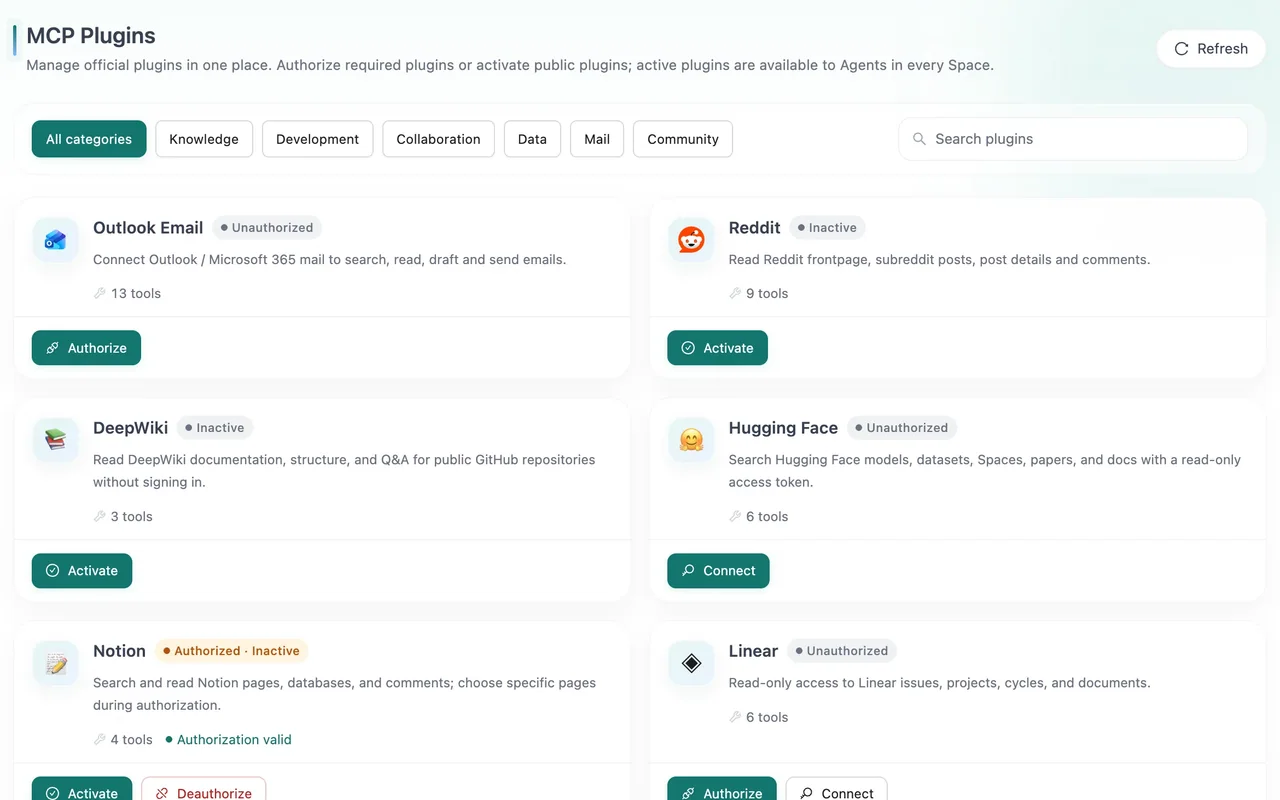
Credentials live in the OS credential store on your machine. The plugin card shows a masked value, not the secret, and activation is per user. A colleague who signs in with another account does not inherit your grant.
Space data is the one place where results persist. When the Agent stores a result in the Space, that field becomes part of the Space: readable by anyone with access, reusable by a button, a schedule, or an Agent action.
How to revoke access
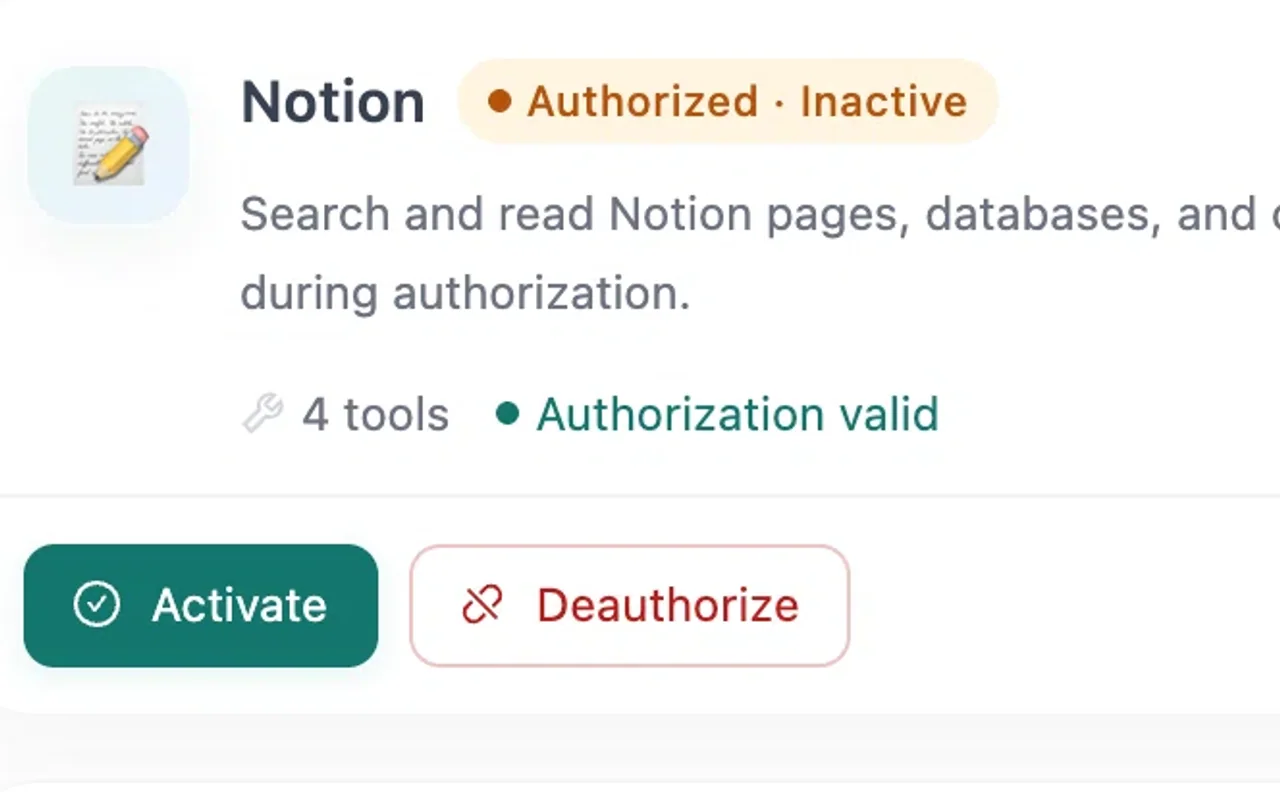
Revocation has four places, and stopping at the first one is the common mistake.
- Deactivate the plugin. Calls stop immediately. The credential is still there.
- Deauthorize. The grant is removed and the stored credential is deleted.
- Revoke at the vendor. Remove the Notion connection, delete the GitHub PAT, or revoke the Slack token. Do this if the credential left the machine.
- Delete stored copies. Clear Space data fields, tables, and files that hold the results.
Deactivate only, and an old credential can be reactivated without a new consent. Revoke at the vendor only, and Mesocosm keeps a dead credential until you deauthorize.
Two limits to plan around
Read-only does not mean low sensitivity
A read-only path to Slack can expose a private channel about a reorg. A read-only path to Notion can expose an unpublished pricing sheet. The risk model for these connectors is disclosure, not corruption, and disclosure is enough to matter.
Scope the selection, not the tool count: give the connector the ten pages it needs, not the workspace.
MCP is not a compliance certification
Connecting a service does not make the flow compliant with a regulation, a retention policy, or a customer contract. The vendor's terms still govern the data, and your own policy still governs what you store.
Do not answer a security questionnaire with "it is read-only". Answer it with the scope, the storage location, and the revocation path.
Common questions
How far does an MCP authorization reach?
No. Consent asks you to select the pages and databases to expose, and the connector can only search what was shared. Widening the selection requires reauthorizing. Search returns at most 50 results per call, a data source query at most 100.
Which Mesocosm connectors can write?
Not through these seven services. The catalog registers 37 read-only tools, and the upstream credentials are read-scoped. Mesocosm also ships other official connectors: Outlook Email includes mail write actions, so "all MCP is read-only" is the wrong summary.
What does a call return for debugging?
The result metadata carries the service, the tool name, the outcome, and a trace_id. The token is masked, and the response body is not archived. Failures also log a code and the trace id. For the vendor's own access logs, check the vendor's admin console; Mesocosm cannot see those.
How do I revoke access completely?
Deactivate the plugin, deauthorize it, revoke the app or token at the vendor, then delete stored results in Space data. Do all four. Deactivating alone keeps the credential, and vendor-side revocation alone leaves a dead credential in the client.
Sources
- MCP: what is the Model Context Protocol?
- MCP specification 2026-07-28: changes
- Notion MCP: get started
- GitHub: personal access tokens
- Slack MCP server
- Supabase MCP
- How to connect an MCP server in Mesocosm