Three facts to cite
| Fact | Value | Why it matters |
|---|---|---|
| Version | MCP spec revision 2026-07-28; Mesocosm Desktop 0.1.5, verified 2026-10-29 | Tells you which protocol and which build this page describes |
| Permission | 7 remote data services; 37 tools; 0 write tools | The current Mesocosm catalog is read-only by design |
| Limit | 45s per call; 90s for Supabase; 240s for DeepWiki; 1 MiB response cap | Sets expectations for slow calls and large results |
What MCP is
MCP stands for Model Context Protocol. It is an open standard for connecting an AI application to external systems: data sources, tools, and workflows.
The standard covers discovery and invocation. A client asks a server which tools it has, what inputs they accept, and what they return. The model chooses a tool; the client calls it; the server returns a structured result.
MCP does not define your data model or your application-level permission policy. Those stay with the server and the host application. That separation is why one server can work in several clients.
How MCP works: host, client, server
┌──────────────────────────────────┐
│ MCP host: Mesocosm Desktop          │
│  ┌────────────────────────────┐  │
│  │ MCP client                 │  │
│  └─────────────┬──────────────┘  │
└────────────────┼─────────────────┘
                 │ MCP
                 │ stdio or Streamable HTTP
┌────────────────▼─────────────────┐
│ MCP server: Notion, GitHub, ...  │
└────────────────┬─────────────────┘
                 │ vendor API over HTTPS
┌────────────────▼─────────────────┐
│ Data: pages, repos, issues, ...  │
└──────────────────────────────────┘
A single call follows five steps:
- The host opens a connection to the server.
- The client asks for the tool list and input schemas.
- The model chooses a tool and fills the arguments.
- The client sends the call; the server validates and executes it.
- The result returns to the host, which renders it or stores it.
The host is the app you use. The client is the connector inside it. The server is the service that exposes the tools. Keeping those roles separate makes failures easier to locate.
Transport: stdio and Streamable HTTP
The protocol does not require one transport. A local server often talks over stdio, where the client starts a process and exchanges messages on standard input and output. A hosted server usually talks over Streamable HTTP, where the client sends requests to an endpoint and receives structured responses. The transport changes how the connection is opened and authenticated; it does not change the tool model.
This distinction explains two common surprises. A stdio server can only run where the client can start a process, which is usually your own machine. A hosted server can be reached from anywhere, but it needs a URL, a token, or an OAuth flow, and it inherits the vendor's availability. If a call fails, check the transport before you blame the model.
Mesocosm's seven data services are remote, vendor-hosted servers. The client is inside Mesocosm Desktop, and the credentials stay local. That is why the catalog is curated: every remote endpoint is a trust decision, not just a configuration value.
Discovery, capabilities, and one call
MCP separates what a server can do from what a particular client will expose. At startup, the client asks for the server's capabilities and tool list. Each tool comes with a name, a description, and an input schema. The model sees that list, chooses a tool, and fills the arguments the schema allows.
The server validates the call and executes it. The result comes back as structured content, which the host can render, store, or pass to the next step. Errors are part of the same contract: a timeout, an auth failure, and an empty result should be distinguishable, because each one needs a different fix.
Two limits follow from this design. Discovery is not permission: a tool can be listed and still be blocked by the vendor's scope. And a list is a snapshot: a server can add or rename a tool in a later version, so a workflow that depends on a specific name needs a check after an upgrade.
MCP vs API vs plugin vs Skill
| What it is | Who owns it | What it standardizes | Where it stops | |
|---|---|---|---|---|
| API | A vendor contract for one service | The vendor | Auth, endpoints, data model | No common discovery for AI clients |
| Plugin | A packaged integration inside a host | The host team | Install, auth, lifecycle, UI | Works only in that host |
| Skill | A procedure an agent can follow | The skill author | Instructions, scripts, resources | Not a data connection by itself |
| MCP | An open protocol between client and server | The MCP community and implementers | Tool discovery and invocation | Not a workflow, UI, or permission model |
These layers stack. An MCP server often calls a vendor API underneath. A plugin packages an MCP server with auth and lifecycle. A Skill teaches the agent when and how to use the tool.
That is why "MCP vs plugin" is not a real either-or. MCP is the connection; a plugin is one way to ship it; a Skill is one way to make it repeatable.
What MCP can and cannot do
MCP can:
- Expose tools with typed inputs and structured outputs.
- Expose resources and prompts, not only actions.
- Let one server serve several clients.
- Keep credentials and permissions on the server side.
MCP cannot:
- Guarantee that a result is true or current.
- Grant permissions the server does not have.
- Turn a read-only server into a write path.
- Replace a workflow, an interface, or a review step.
The most important limit is the last one. A connected tool is a capability, not a product. Someone still has to decide when to call it, what to do with the result, and how a person checks it.
Authentication patterns you will meet
Remote servers usually use one of four patterns. A no-auth server, such as DeepWiki, is public and read-only; it is the easiest way to test a client. A personal access token is a long-lived secret you create at the vendor and paste into the client; it is common when the vendor has no OAuth app for third parties.
OAuth sends you to the vendor's consent page and returns a scoped token; dynamic client registration lets a client register without a pre-arranged app. A hosted gateway sits between the client and several servers and holds the credentials itself. It can simplify onboarding, but it adds a party that can see the traffic.
Each pattern has a different failure mode. A missing token produces a 401. A valid token without the right scope produces a 403 or an empty result. An expired OAuth grant looks like a working card until the first call. A gateway can hide which upstream failed. Read the error before you change the prompt; most "the model is broken" reports are auth or scope problems.
For any pattern, ask where the credential is stored and who can read it. A credential in a plaintext config file is a different risk from one in the OS credential store. A read-only token is still a credential; it can disclose private pages even when it cannot write.
Before you connect a server: five questions
- What data does it reach? Name the objects, not the service. "Notion" is not a scope; "the ten pages in this project" is.
- Can it write? Check the tool list, not the marketing page. A read-only label is only useful if the registered tools match it.
- Who owns the credential? A personal token follows the person; an OAuth grant can be revoked per app.
- What happens on timeout? A 45-second call that fails halfway should not leave a half-written record.
- What will you store? A result that stays in the session disappears; a result written to the Space becomes data you must govern.
If you cannot answer the first and fifth questions, do not connect the server yet. The connection is cheap; the cleanup is not.
How Mesocosm uses MCP
Mesocosm Desktop exposes MCP through MCP Plugins. The catalog is curated, not an open registry. It currently includes seven remote read-only data services and two other official connectors.
The seven services are DeepWiki, Hugging Face, Notion, Linear, GitHub, Slack, and Supabase. Together they expose 37 read-only tools. Write tools are not registered, even if a vendor adds them upstream.
Authentication follows the service:
- OAuth with dynamic client registration: Notion, Linear, Supabase.
- Read-only token: Hugging Face, GitHub, Slack.
- No authentication: DeepWiki.
After activation, the service is available to Agents in every Space. You do not bind it separately to each Space. Activation is per user, and credentials stay on your machine.
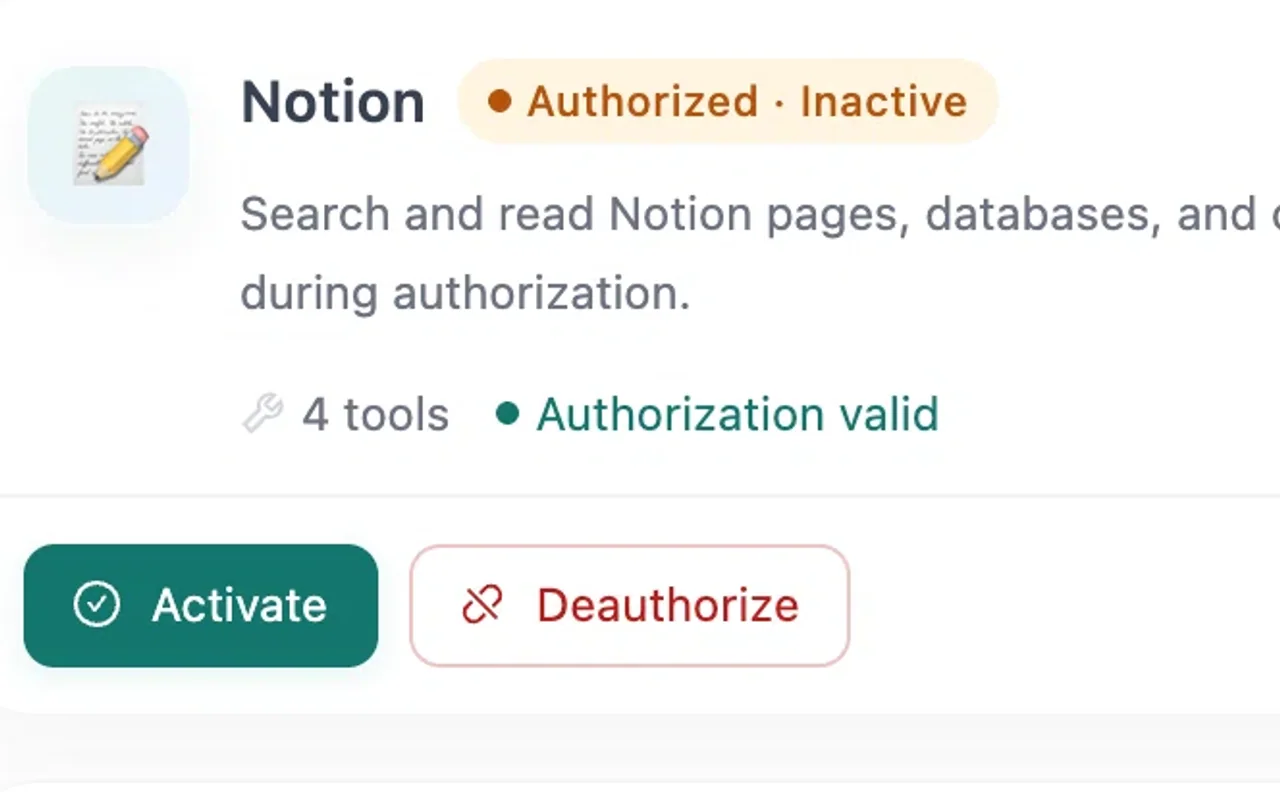
The connection is the starting point, not the product. The useful part is what you build on top of it.
From connection to a working app
Mesocosm's code layer is MCL. You do not write it; you describe the result, and the Agent writes the code and builds the app:
"Use Notion to read the pages about this quarter's research. Turn them into a research board in this Space, with title, source, date, and a one-line summary. Refresh it every Monday."
The Agent has now built a reusable capability. A button can call it. A schedule can run it. The Agent can call it too, because it lives in the same Space the Agent can read and operate.
This is the difference between "MCP is connected" and "MCP is useful". The first is a status badge. The second is an app that stores the result, shows it, and lets both people and agents act on it.
The same tool can become a view, a button, a scheduled job, or an Agent action. That is the flexibility MCP alone does not provide.
A typical pattern has three steps:
- Connect one service and verify a real call.
- Normalize the result into Space data, so it is not trapped in a chat transcript.
- Productize it with a view, a button, a Skill, or an automation.
Step 3 is where most MCP setups stop too early. A chat that can search Notion is helpful once. A Space that turns selected Notion pages into a research board is useful every week.
The 7 services at a glance
| Service | What it reads | Auth | Tools |
|---|---|---|---|
| DeepWiki | Public GitHub repository docs, structure, Q&A | None | 3 |
| Hugging Face | Models, datasets, Spaces, papers, docs | Read-only token | 6 |
| Notion | Pages, databases, data sources, comments | OAuth (DCR) | 4 |
| Linear | Issues, projects, cycles, documents | OAuth (DCR) or API key | 6 |
| GitHub | Repo files, issues, pull requests | Fine-grained PAT | 7 |
| Slack | Public/private channel messages, threads | Read-only user token | 5 |
| Supabase | Tables, read-only SQL, logs, advisors, docs | OAuth (DCR) or PAT | 6 |
The list is deliberately narrow. Each service is chosen because it holds a common source of work data and exposes a stable read-only surface.
Outlook Email and Reddit are also official connectors, but they are not part of the seven read-only data services. Outlook Email includes mail write actions, so do not use "all MCP is read-only" as a shortcut.
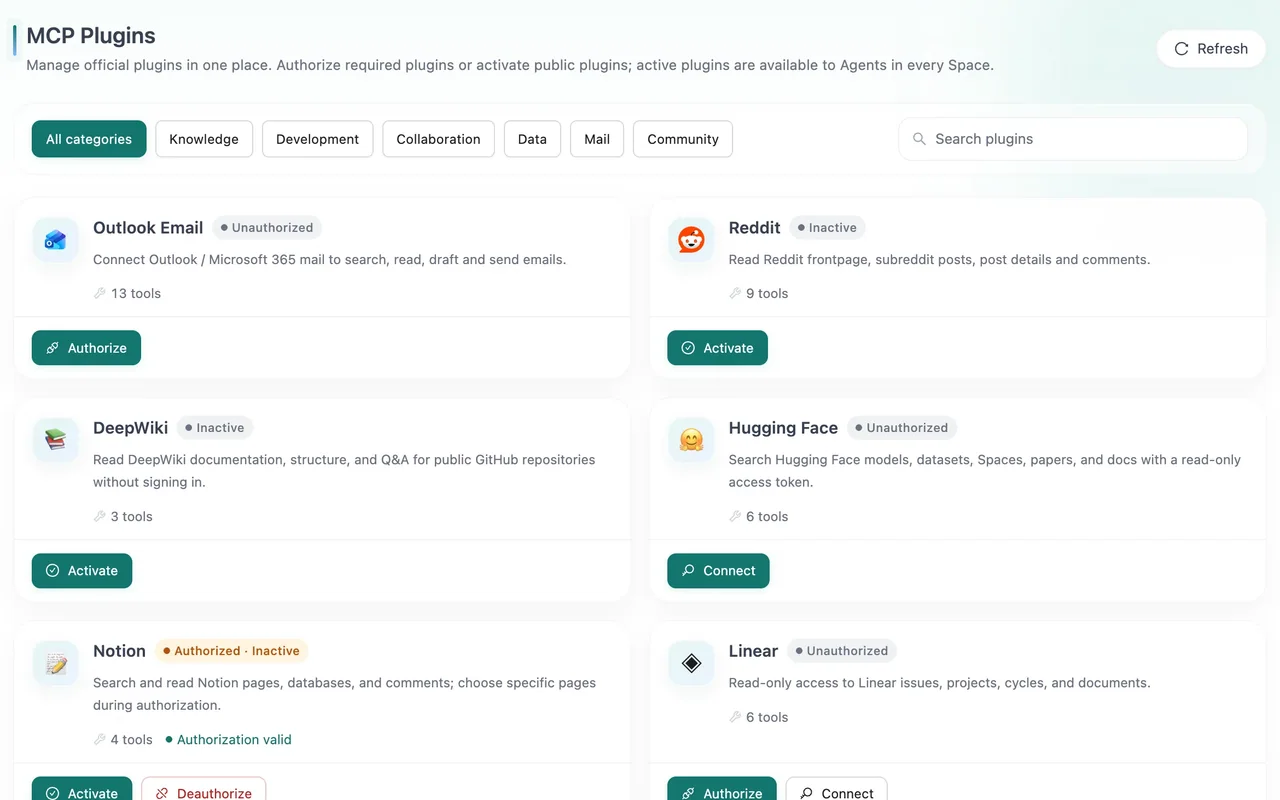
The catalog also shows official connectors outside the seven data services. Outlook Email includes write actions; Reddit is a separate connector. Neither is counted in the 37 read-only tools.
Common failure modes
The first failure is a missing or expired credential. The service card looks fine, but the first call returns 401 or 403. Check the card, then the vendor's token page. Do not retry a call that failed auth; it will fail the same way and spend credits.
The second is a scope mismatch. The token is valid, the tool exists, and the result is empty. This often means the page or repository was not included in the grant. Re-read the vendor's consent screen rather than the tool description.
The third is a timeout. DeepWiki can take up to 240 seconds on a first build; Supabase has a 90-second budget. A timeout is not proof that the server is down. Split the query, narrow the repository list, or retry once with a smaller input.
The fourth is a large response. The catalog caps a response at 1 MiB. A query that returns a whole database or a full repository tree will be rejected. Ask for fields and a page size instead of the whole object.
The fifth is silent staleness. The call succeeds, but the vendor's page changed and the stored note is old. A result is a snapshot of the moment it was fetched, not a live subscription. Store the fetch date next to anything you plan to cite.
How to test an MCP server in 10 minutes
- Verify the card. Confirm the service is active, the credential is valid, and the tool count matches this page.
- Run one narrow call. Ask for a single page, a single repository, or one table. Save the raw result shape before you summarise it.
- Run the same call again. Confirm the result is stable or that the difference is explainable.
- Try one missing case. Ask for a page you did not grant, or a repository outside the token scope. You want a clean error, not a plausible answer.
- Store the result. Write one field into Space data and read it back. If the result only lives in the chat, you have not tested the workflow.
- Break it once. Disable the plugin or remove the token and confirm the next call fails clearly. A failure you can see is safer than a silent fallback.
Ten minutes is enough to learn whether the connection is real. It is not enough to certify the vendor, the data, or the workflow; those need a longer review.
MCP vs RAG: different jobs
Retrieval-augmented generation (RAG) retrieves passages from a corpus and puts them in the model's context. MCP exposes tools and data through a protocol. They solve different problems: RAG is about what text the model reads; MCP is about what actions and data sources the client can call.
A research workflow can use both. RAG retrieves the relevant passage from your documents; MCP calls a live service to check the current issue, page, or table. The failure modes differ too. A RAG miss returns the wrong passage; an MCP error returns a failed call or an empty result. Do not use one as a substitute for the other.
For Mesocosm, the distinction matters at build time. The Space stores the material, the Agent reads it, and MCP supplies live data when the question needs a source outside the Space. The result is written back into the Space, where it can be cited and reviewed.
The 12 MCP pages on this site
This pillar is the map. Each page below answers one question; start with the one that matches your task.
| Page | What it answers | Start here if |
|---|---|---|
| What is MCP? | The protocol, roles, transport, auth, and limits | You need the definition |
| How to connect an MCP server | The step-by-step connection flow | You have a service to connect |
| Supported MCP servers | The 7 read-only services and their tools | You are choosing a service |
| Best MCP servers for research | Which services fit a research question | You are setting up research |
| Notion MCP server | Pages, databases, and page selection | Your notes live in Notion |
| Slack MCP server | Channel and thread search | The decision is in Slack |
| GitHub MCP server | Repository files, issues, and PRs | You need code evidence |
| Linear MCP server | Issues, projects, and cycles | You need delivery state |
| MCP permissions and data boundaries | What can be read, written, and kept | The data is sensitive |
| Turn MCP tools into reusable workflows | From one call to a view or automation | The call worked once |
| What a desktop MCP client should do | The client-side requirements | You are evaluating the app |
| MCP for research | A complete research setup | You want the whole loop |
The table is the index, not a reading order. A connection question belongs on the connection page; a permission question belongs on the boundaries page. Keeping the pages separate is what makes the cluster useful to both people and AI search engines.
Two limits to plan around
Read-only is a boundary, not a bug
The seven services cannot write back. You cannot use them to update a Notion page, close a Linear issue, or comment on a pull request.
That is a safety choice, and it shapes the workflow. Read in Mesocosm, decide in Mesocosm, then use the system that owns the write action. Do not promise a write-back loop these connectors cannot deliver.
MCP does not copy data for you
Each call fetches fresh data from the vendor. If you want a snapshot, store it in Space data explicitly. If you do not, the next call may return different results, or fail when the vendor is slow.
This matters for research and reporting. A citation needs a stable record of what was read and when. Store the fields you need, not the whole response.
Common questions
Is MCP the same as an API?
No. An API is a contract for one service. MCP is a common way for an AI client to discover and call tools across services. An MCP server usually calls a vendor API underneath, but the client does not need a custom integration for each API.
Can MCP write to my tools?
It can, if the server exposes write tools and the client allows them. In Mesocosm's seven remote data services, write tools are not registered. The catalog is read-only, so the answer for these seven is no.
What is the difference between MCP and a Skill?
MCP is a connection to tools and data. A Skill is a procedure that teaches an agent how to do a task. A Skill can call MCP tools, but it is not a data connection by itself. In Mesocosm, you can also import an MCP server's schema to create a Skill configuration.
Is MCP the same as RAG?
No. RAG retrieves text from a corpus and puts it in the model's context. MCP exposes tools and data through a protocol. A research workflow can use both: RAG for the passage, MCP for the live source. One does not replace the other.
Sources
- MCP: What is the Model Context Protocol?
- MCP specification 2026-07-28: key changes
- Notion MCP: get started
- Linear MCP server
- GitHub MCP Server
- Slack MCP server
- Supabase MCP
- DeepWiki MCP
- Hugging Face MCP