Start from the decision, not the form
Name the decision the tool supports: approve an expense, assign a lead, close a ticket. A tool that speeds up a decision has a clear first version; a tool that "manages" something usually does not.
Then name the person who makes that decision and how often. Frequency tells you whether to build it at all.
Describe the data before the interface
List the fields, where they come from, and which one is the source of truth. Most failed internal tools are data disagreements wearing an interface.
Write five sample records. Real examples are more useful than a schema: they expose missing fields, duplicates, and the awkward cases that a clean description hides.
Let the first version be small
Ask for one screen that lists the records, one filter, and one action. Use it on real work for a week before adding anything. A small tool that is used beats a complete tool that is admired.
When something is missing, describe the workaround you did instead. "I exported to a spreadsheet and added a column" tells AI exactly what the next version needs.
Change it where the work lives
The reason to build internally is that requirements move. Keep the tool and the request in the same place so a change does not start with a new project.
Name each change by the work it unblocks, not by the component it touches. "I need to see last month's approvals in one list" is a change request; "add a date picker" is a guess about the solution.
What you can do alone, and what needs help
The honest split is not "technical or not". It is which part of the job needs a system you do not control. Use this table before you promise a build.
| Task | You can do it alone | Bring in help when |
|---|---|---|
| Name the decision and the person who makes it | Yes, in one conversation with that person | Nobody can name the decision or its owner |
| Model the fields and five sample records | Yes, if the data already lives in a spreadsheet or a file | The source has no stable export or two teams dispute the field |
| Build the first screen, filter, and action | Yes, by describing the work | The screen needs SSO, a native mobile app, or offline sync |
| Connect a live database | Partly, through an exported snapshot or an MCP server | You need row-level sync, write-back, or a connector that does not exist |
| Set who can see which records | Partly, inside one Space | You need the same permission model as the company directory |
| Keep it working after week one | Yes, if you can describe the next change | It becomes a system of record with audit and uptime guarantees |
For the database question specifically, read what an App for Agent can reach. It separates a read-only snapshot from live sync, which is the difference between a useful first version and a promise you cannot keep.
The smallest version that is still useful
Build only these three things:
- One screen that lists the records you already keep.
- One filter that answers the question you ask every week.
- One action that changes the status of a record.
Add five real records and one named owner. Then use it for five working days and log every workaround you did by hand. The workarounds are the next version's requirements; the features nobody used are not.
Traditional low-code vs an AI-built internal tool
Low-code is not the wrong answer. It is the right answer when you need a mature permission model, a large team, and a platform you can hand to a trained builder. The table below is a starting point, not a buying recommendation. Prices were checked on 2026-10-27 and change often.
| Option | Starting point | Who builds | Change model | Cost shape (checked 2026-10-27) | Fits when |
|---|---|---|---|---|---|
| Retool | A component canvas and data connections | A developer or ops builder | Edit the app and redeploy | Free for 5 users; Team from $10/builder + $5/internal user/mo | You need a broad internal app platform |
| Budibase | A low-code app with self-hosting | A builder with some technical help | Edit the app in the builder | Pro from $19/mo; Premium $49/mo; Business $299/mo | Self-hosting or open-source control matters |
| Appsmith | An open-source app builder | A developer or technical ops | Edit and republish | Free cloud for 5 users; Business from $15/user/mo; Enterprise from $2,500/mo for 100 users | You want an open-source base and a large app |
| An AI-built Space | A conversation and a Space | The person who does the work | Ask for the change in the same Space | AI credits per call; no separate per-user platform fee | The tool is specific and the requirements move |
The real comparison is not feature count. It is who can change the tool after week one. A low-code platform assumes a builder; an AI-built Space assumes the person who understands the work can describe the change.
No-code report builder: when the spreadsheet stops working
A no-code report builder is a different job from an internal tool: the output is a recurring report, and the tool exists to refresh it, check it, and hand it over. The moment worth admitting is when the spreadsheet stops being the record and becomes the bottleneck.
Start with the six reports a team rebuilds by hand: approvals, spend, pipeline, hiring, support load, renewals. For each one, name the source, the check that fails loudly, and the person who reads the result. If two or three share a source and a check, one small tool covers them; if they share neither, build them one at a time.
For the analyst version of this path, read the no-code app builder for analysts.
Three internal builds that run today
These are our own Spaces, not customer stories. They use real data and are shown here because they fit the same pattern: a decision, a small first version, and a change loop.
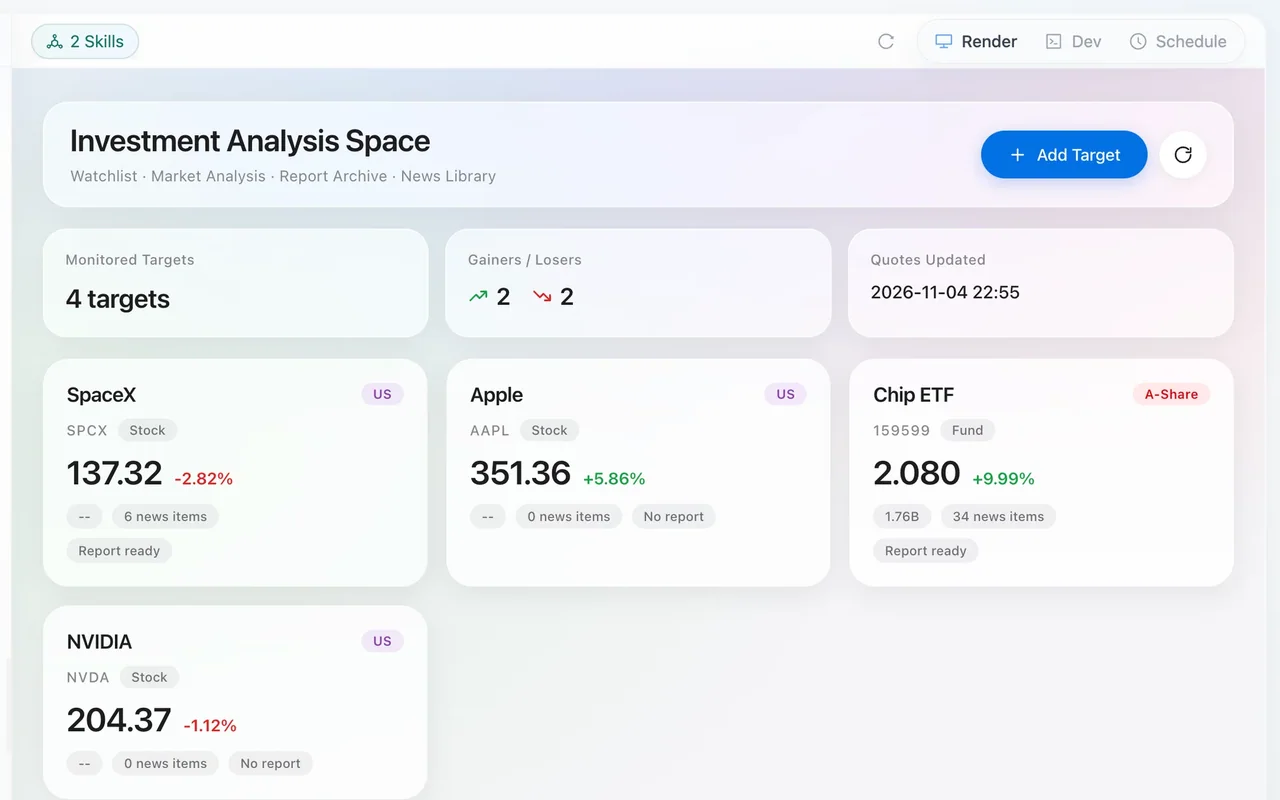
Investment Analysis Space
A watchlist with monitored targets, a report archive, and a news library. The first version answered one question: what changed since the last check? The view now holds four targets and a report state for each. It is a tool because the state survives the question, not because it has more screens.
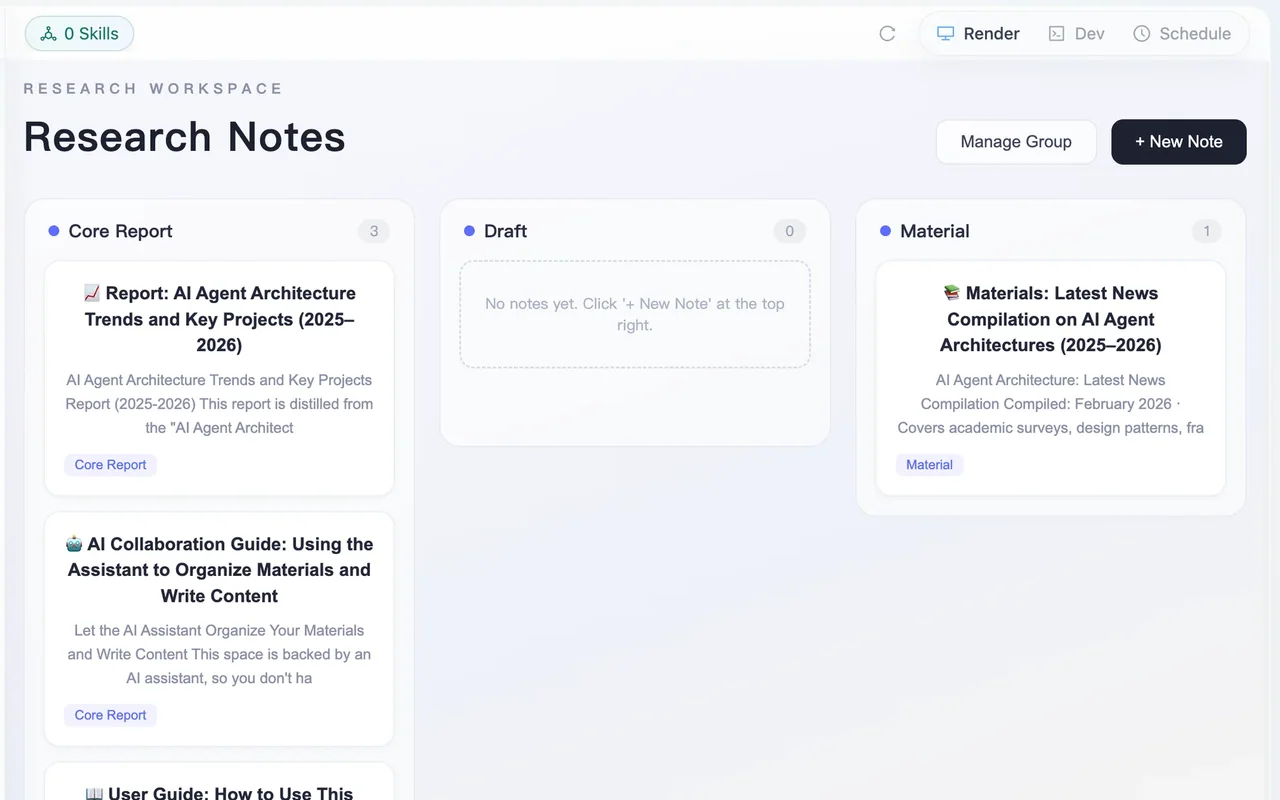
Research Notes
A research workspace with core reports, a draft column, and a material column. The unit is a note that can be reopened next month, with the source next to it. This is the pattern to copy when the tool is closer to a research desk than to an approval queue.
X growth war room
A topic library, a posting plan, and a review board. The table is the tool: each row is a topic with a status and a priority, and the weekly review changes the status. The lesson is that an internal tool can be mostly a table, as long as the table has ownership and a change loop.
The three builds share one trait: the first version was small enough to use, and the next version came from a real workaround rather than a redesign. That is the part a no-code platform and an AI-built Space can both get right; the difference is who can make the change.
How to run it on Mesocosm
Create one workspace for the tool, describe the decision and the five sample records, and let AI build the first screen. Use it, then ask for changes in the same workspace so the tool and its history stay together.
For the setup, read how to build your first app with AI. If you work from spreadsheets, the no-code app builder for analysts continues the same path. If you are still deciding whether the spreadsheet is enough, read internal tool vs spreadsheet first.
How to judge whether this works for you
| Check | What to run | Passes when | Fails when |
|---|---|---|---|
| One-decision test | Write the decision, the person who makes it, and how often. | All three are named. | You cannot name all three; do not build. |
| Five-record test | Put five real records into the first version. | Fields are populated or deliberately blank with a reason. | A field is missing or disputed. |
| Week-one usage | Use it for five working days and log every workaround. | Someone opens it by day five. | Nobody opens it; the problem is the job. |
| Change-loop test | Make one change request in the same workspace and check the earlier version and its history. | Both remain, and the change lands in the same app. | The change needs a rebuild from scratch. |
| Access test | Add a second user with lower access and confirm restricted records stay hidden. | The restricted records stay hidden. | Permissions were an afterthought. |
| Stranger test | Ask a colleague who did not build it to complete one decision without you. | They finish from the screen and a two-line note. | They need you to explain the data or the buttons. |
Two limits
Input limit: no stable source and a decision that lives in someone's head
If the fields change weekly or the source is a disputed spreadsheet, the tool will encode the dispute. If the decision depends on a person's inbox or memory, the first version can display data but cannot support the decision.
Capability limit: it is not an ERP and not an enterprise permission model
It builds a focused screen and a change loop; it does not replace a system of record, provide enterprise audit guarantees, or manage a large multi-team permission model. Those need a platform built for them.
Common questions
Can it connect to our existing database?
It can read from files and data you expose to the workspace; it is not a drop-in connector for every system. Confirm the source and its access path before promising a live sync.
How many credits does a first version use?
Credits follow AI calls, not screens: a small first version is a short conversation, and each change adds calls. Build the one-screen version, read the ledger, then decide the weekly change budget.
What happens when the data source changes format?
The tool may show stale or empty fields without an error. Add a check that fails loudly and name the owner of the source; a silent format change is the most common way an internal tool dies.
How is this different from a low-code platform?
Low-code assumes a trained builder and a platform; this assumes the person doing the work can describe the change. The tradeoff is governance and scale: choose low-code when you need a mature permission model and a large team.
Next step
Write the decision, the five sample records, and the one action the first version needs. Then ask for that version only.